 主页
主页
Awesome Claude Agents:给 Claude Code 配一支 24 人 AI 开发团队
用一支各司其职的专家 AI 智能体团队给 Claude Code 加 buff:协同构建完整功能、调试复杂问题、以专家级知识应对任何技术栈。作者:vijaythecoder。
项目是什么 + 重要警示
01这是一个开源的 子智能体(subagent)合集:把 24 个写好的专职 agent 定义装进 Claude Code 的 ~/.claude/agents/,你的 Claude 就从「一个全能选手」变成「一支有技术主管、有框架专家、有 QA 的开发团队」——描述需求,团队自动检测你的技术栈并调度对口专家。
三分钟上手
02前置条件
- Claude Code CLI 已安装并完成认证
- Claude 订阅——高强度 agent 工作流必需
- 一个有代码库的活跃项目目录
- 可选:Context7 MCP,增强文档访问能力
git clone https://github.com/vijaythecoder/awesome-claude-agents.git
方式 A · 软链接(推荐,自动跟进更新)——macOS/Linux:
# Create agents directory if it doesn't exist (preserves existing agents)
mkdir -p ~/.claude/agents

# Symlink the awesome-claude-agents collection
ln -sf "$(pwd)/awesome-claude-agents/agents/" ~/.claude/agents/awesome-claude-agents
Windows(PowerShell):
# Create agents directory
New-Item -Path "$env:USERPROFILE\.claude\agents" -ItemType Directory -Force

# Create symlink
cmd /c mklink /D "$env:USERPROFILE\.claude\agents\awesome-claude-agents" "$(Get-Location)\awesome-claude-agents\agents"
方式 B · 复制(静态,不自动更新):
# Create agents directory if it doesn't exist
mkdir -p ~/.claude/agents

# Copy all agents
cp -r awesome-claude-agents/agents ~/.claude/agents/awesome-claude-agents
claude /agents
# Should show all 24 agents.
进入项目目录,运行以下命令配置你的 AI 团队:
claude "use @agent-team-configurator and optimize my project to best use the available subagents."
claude "use @agent-tech-lead-orchestrator and build a user authentication system"
你的 AI 团队会自动检测技术栈、调用对口的专家!
自动配置的六步原理
03@agent-team-configurator 会自动搭好最适合你的 AI 开发团队。被调用时它依次做六件事:
找到既有项目配置,并保留「AI Team Configuration」小节之外你的全部自定义内容。
检查 package.json、composer.json、requirements.txt、go.mod、Gemfile 及构建配置,理解你的项目。
扫描 ~/.claude/agents/ 和 .claude/ 文件夹,构建一张覆盖所有可用专家的能力表。
优先选择框架专属 agent 而非通用 agent;总是把 @agent-code-reviewer 和 @agent-performance-optimizer 纳入做质量保障。
创建带时间戳的「AI Team Configuration」小节,写入检测到的技术栈和一张「任务 | Agent | 备注」映射表。
展示检测到的栈、选中的 agents,并给出可直接开工的示例命令。
24 个智能体全阵容
04🎭 编排器(3 个)
- Tech Lead Orchestrator(技术主管编排器)——资深技术负责人,分析复杂项目、协调多步开发任务。
- Project Analyst(项目分析师)——技术栈检测专家,支撑智能的 agent 路由。
- Team Configurator(团队配置器)——AI 团队搭建专家,检测你的栈并配置最优 agent 映射。
💼 框架专家(13 个)
- Laravel ×2:Backend Expert(MVC、服务层与 Eloquent 模式的全面 Laravel 开发)、Eloquent Expert(高级 ORM 优化、复杂查询与数据库性能)。
- Django ×3:Backend Expert(按当前 Django 约定写模型/视图/服务)、API Developer(Django REST Framework 与 GraphQL 实现)、ORM Expert(Django 应用的查询优化与数据库性能)。
- Rails ×3:Backend Expert(遵循约定的全栈 Rails 开发)、API Developer(Rails 风格的 RESTful API 与 GraphQL)、ActiveRecord Expert(复杂查询与数据库优化)。
- React ×2:Component Architect(现代 React 模式、hooks 与组件设计)、Next.js Expert(SSR、SSG、ISR 与全栈 Next.js 应用)。
- Vue ×3:Component Architect(Vue 3 Composition API 与组件模式)、Nuxt Expert(SSR、SSG 与全栈 Nuxt 应用)、State Manager(Pinia 与 Vuex 状态架构)。
🌐 通用专家(4 个)
- Backend Developer——跨多语言多框架的多面手后端开发。
- Frontend Developer——面向任意框架的现代 Web 技术与响应式设计。
- API Architect——RESTful 设计、GraphQL 与框架无关的 API 架构。
- Tailwind Frontend Expert——Tailwind CSS 样式、utility-first 开发与响应式组件。
🔧 核心团队(4 个)
- Code Archaeologist(代码考古学家)——探索、记录并分析陌生或遗留代码库。
- Code Reviewer(代码评审员)——严格的、有安全意识的评审,报告带严重度标签。
- Performance Optimizer(性能优化师)——定位瓶颈并施加优化,面向可扩展系统。
- Documentation Specialist(文档专家)——产出完善的 README、API 规格与技术文档。
为什么团队胜过单体 AI
05- 专业分工——每个 agent 深耕自己的领域,知识深且新。
- 真实协作——agents 之间无缝协调,共享上下文、交接任务。
- 贴身方案——产出的代码匹配你的具体技术栈、遵循该栈的最佳实践。
- 并行执行——多个专家同时开工,交付更快。
项目宣称的收益(README「The Impact」)
资源、社区与术语
06深入学习
- Creating Custom Agents——为你的需求构建专属专家
- Best Practices——把你的 AI 团队用到极致
加入社区
许可证:MIT License——在你的项目里自由使用!
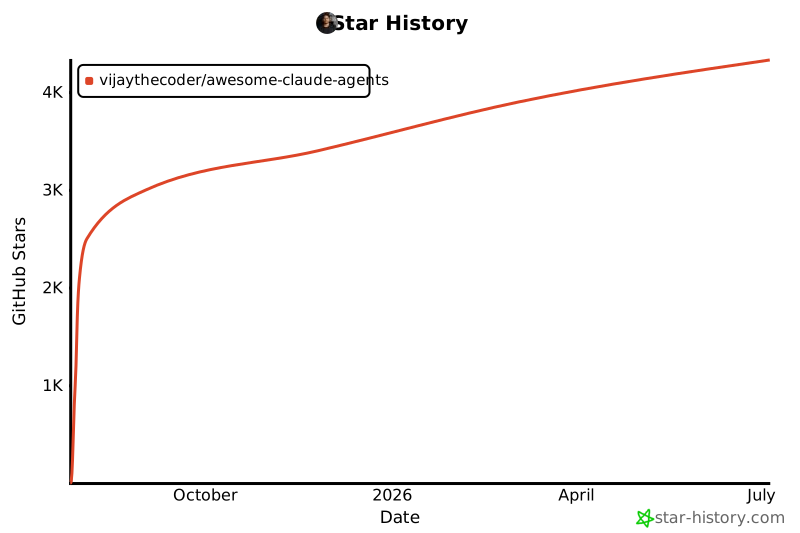
简单安装,强大效果。描述即构建。
术语表(增补)
- 子智能体(subagent)
- Claude Code 中在独立上下文里运行的专职 agent,由 markdown 文件定义(角色 + 工具 + 系统提示)。
- 编排器(orchestrator)
- 负责拆解任务、把子任务路由给对口专家的「管理型」agent。
- @agent-xxx
- 在提示里显式点名某个 agent 的调用语法。
- Context7 MCP
- 一个提供最新框架文档检索的 MCP 服务器,供 agent 查阅现行 API 用法。
- Eloquent / ActiveRecord / Django ORM
- Laravel、Rails、Django 三大框架各自的对象关系映射层——项目为每个都配了专门优化专家。
一句话带走
这个项目把「子智能体」玩成了组织学:编排器管调度、专家管实现、核心团队管质量,并用 team-configurator 把整套阵容自动写进 CLAUDE.md。代价也写得很诚实——实验性、且一个复杂功能就可能烧掉 1–5 万 token。